--------clip the image mosaic----------------------------
starting with 1m resolution mosaic sonar image sana1m.img (see proceesing history for development of mosaic) on rouse
convert to sana1m.tif with export
ftp to desktop
imagegrid sana1m.tif sana1mg
use arcedit to find xy extent of valid pixels
gridclip sana1mg sana1mgc x1 y1 x2 y2
del sana1m.tif sana1m.tfw
gridimage sana1mgc none sana1m.tif tiff none
on rouse rm sana1m.tif sana1m.img sana1m.lbl
import sana1m.tif sana1m.img
---------classification of rock areas----------------
csh rockjob1 for eastern area
csh rockjob2 to classify rock in western anacapa passage area
mask and mosaic together to produce sana1mrck_msk.img
stretch 0;0 1;255 20;255 21;0 254;0 255;255 to produce sana1mrck4.img
ftp to desktop for photoshop editing
open in photoshop and duplicate layer on sana1m.raw as background
photoshop painting out noise with black
----------classification of mixed areas-------------
on rouse:
csh mixedjob
sana1mmix.img rename sana1mmix.raw
ftp to desktop
open in photoshop and duplicate layer on sana1m.raw as background, then save as sana1mmix1.psd
photoshop painting out noise with black
save as sana1mmix1.raw
ftp to rouse
convert to tiff sana1mmix1.tif with export
ftp to desktop
imagegrid sana1mmix1g
gridpoly sana1mmix1p
arcedit sana1mmix1p
sel area < 10 and grid-code = 0
calc grid-code = 255
polygrid sana1mmix1p sana1mmix2g grid-code
gridpoly sana1mmix2g sana1mmix2p
------------------------------------
Nadine Golden starts editing the data at this point
arcedit to remove zero polygons that are shadow
save sana1mmix3p
polygrid sana1mmix3p sana1mmix4g
gridpoly sana1mmix4g sana1mmix4p
arcedit to remove 0 gridcode polygons in mixed areas at east and west
edge of the mosaic
save sana1mmix4p
polygrid sana1mmix4p sana1mmix5g
ae
sel grid-code = 255
calc grid-code = 170
polygrid sana1mmix3p sana1mmix4 grid-code
------------------------------------
for soft bottom
stretch sana1m sana1mmud 0;0 1;85 255;85
export sana1mmud.tif
imagegrid sana1mmud.tif sana1mmud
---------------------------------------------------
//converted tiff to grid in arcinfo using imagegrid command
imagegrid sana1mmud sana1mmud1g
imagegrid sana1mrck12 sana1mrck12g
//cleaned out Photoshop values by converting grid to polygon and edited polygon in arcinfo.
gridpoly sana1mrck12g sana1mrck12p
ae
ec sana1mrck12p
sel grid-code = 255 or grid-code = o
nselect
calc grid-code = 0
polygrid sana1mrck12p sana1mrck13g grid-code
//merged grids in arcinfo
copy sana1mmud1g sana1hab1g
grid
gridedit edit sana1hab1g
gridedit gridmerge zero sana1mmix5g sana1mrck13g
//Steps for creating anacapa island grid
1. created polygon feature class of anacapa island in ArcMap by tracing the island off the coast shape file using the edit mode trace tool.
anacapa_island.shp
2. Converted polygon feature class to polygon coverage
using ArcMap Spatial Analyst-->convert polygon feature to polygon coverage.
anacapa_island.shp-->anacapap1
3. cleaned coverage using ArcInfo
build anacapaP1
clean anacapaP1
4. converted polygon coverage to grid using ArcInfo poly grid anacapap1 anacapag1 grid-code
//Steps to creating near shore rock grid (using ArcMap and ArcTool Box)
1. created polygon feature class of rock in ArcMap by loosely tracing the outer (closest to land) rock area and closing the polygon with a line.
rock.shp
2. created grid using arctoolbox feature class to grid toolrock.shp rockg1
3. using spatial analyst tool reclassify, converted values of rockg1 from 0 to 255 and named new file: rock2g
//Calculate final grid with cleaned near shore data (from mud to rock) and no data where there is land
1. Set up ArcMap project with all grids: sana1mhab2g, anacapag1, rock2g
2. Spatial Analyst tool
-set option to Extent-->union of inputs.
-in raster calculator dialogue box merge grids of rck and hab:
sana1mhab3g = merge([rock2g],[san1mhab2g])
//Calculate no data where there is land
1. Create shapefile mask
-create new polygon feature class in ArcCatlog
-add new polygon to project
-using ArcMap Editor make new polygon a rectangle around all data (around sana1mhab3g)
-in arctoolbox-->analysis tool-->-->erase
erase anacapa polygon from new rectangle polygon
new shapefile_erase has hole of island data
-in spatial analyst-->options-->set mask-->use drop down to select newerase shapefile
2. Recalculate sana1hab3g with new mask poly by using the spatial analyst's raster calculator
[sana1mhab4g] = [sana1mhab3g] --> select evaluate
resulting grid has a hole (no data) where land was
//set all 0 data to no data
1. in spatial analyst raster calculator divide grid by itself
sana1mhab4g]/[sana1mhab4g]
where 0/0 will equal no data
all other data will be equal to 1
calculation leaves you with value 1 where there was data
2. in spatial analyst raster calculator multiply new calculation by original grid:
sana1mhab5g = [sana1mhab4g] * [Calculation]
so all values * 1 gives you original data
//Breakup large mud polygon
1. Used Raster Cleanup tool to paint breaklines in polygon
2. converted to polygione shapefile.
Note: this step took several attempts in order to maintain integrity of data and the final shapefile in this step was sana1mhab21s.
3. edited polygon shapefile sana1mhab21s to asign new gridcodes to polygons in the west and north west region of data.
2. converted shapefile back to raster with Toolbox. final grid is sana1mhab21g.
//Filter grid to decrease polygon total
steps:
1. filtered original grid using the "low" filter default
filter sana1mhab21g sana1mhab23g
(note: made and error on grid sana1mhab22g so advanced one to 23g)
2. reclassified new grid using the categories you sent me in attached remap.txt file.
used spatial anlysis reclassification option
3. converted new floating point grid to an integer grid.
sana1mhab24g = int(sana1mhab23g)
4. Using Toolbox Raster to Features: converted new floating integer grid to polygon shapefile
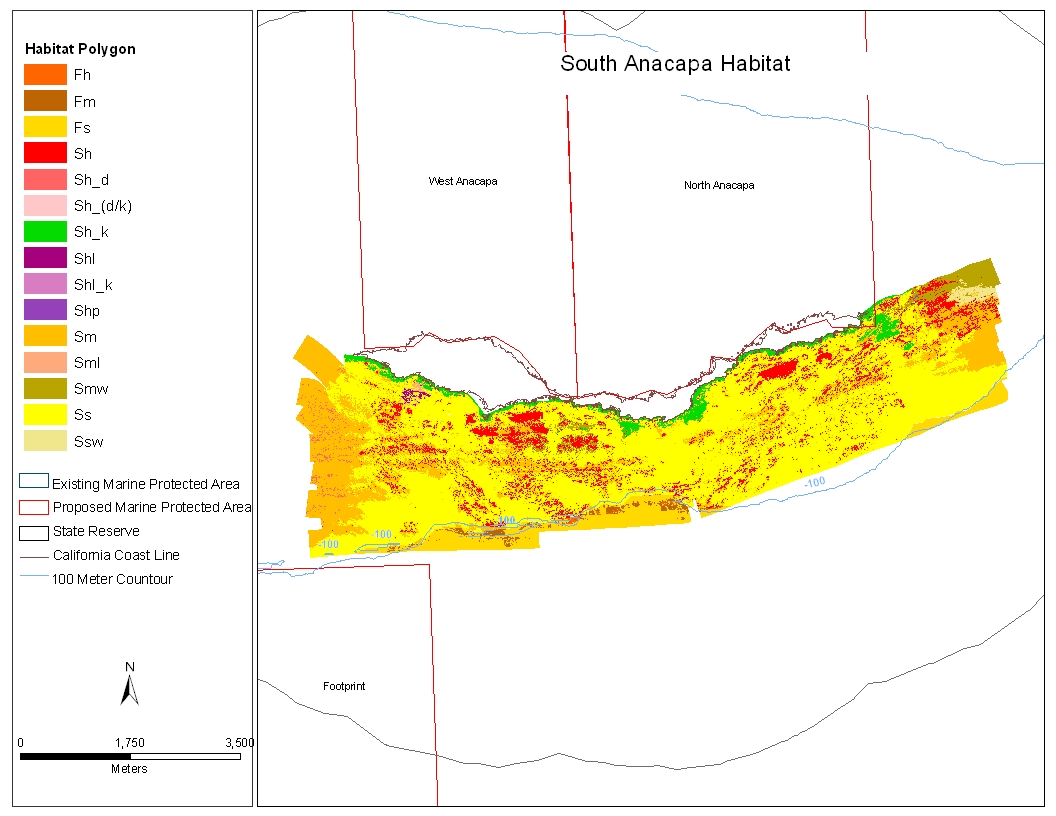
new polygon shapefile: 169,051 polygons
original polygon shapefile: 386,777 polygons